Guarantee Guide (Demand Guarantee)
App route: /guarantee (alias
/commitments/demand-assurance) · Verification service category: INS·03 Demand Assurance (conventional equivalent: bank guarantee)Read the common steps A to C first (sign in, KYC, fees, how to withdraw).
Prototype vs. sandbox trial. The steps below describe the testnet prototype: the applicant deposits test tokens as collateral in a smart contract, and the issuer and claim-examiner roles are played by SPANIRA test accounts. In the trial, with your consent SPANIRA forwards the verification result and a referral package to the partner bank you choose; the bank may issue a bank guarantee on its own decision or decline. If a bank guarantee is issued, the bank examines any demand for payment against the guarantee terms (URDG 758), and the bank decides on and makes the payment. Any cash margin the bank asks for follows the bank's terms and is held by the bank, not by SPANIRA. SPANIRA records document fingerprints and runs preliminary checks; it does not issue the guarantee and does not hold funds. No bank has yet signed a referral cooperation agreement with SPANIRA.
Quick summary (1 minute)
- The applicant fills in the form at /guarantee (choosing a guarantee type), clicks Minta Jaminan Atas Permintaan (request demand guarantee), then deposits collateral (Izinkan token → Setor jaminan). The issuer (in the prototype: a SPANIRA test account) activates the guarantee.
- As long as the contract is fulfilled, the guarantee is not drawn.
- If the applicant fails to perform, the beneficiary submits a claim → the claim is examined → objection window → it is paid.
- If no claim is made before expiry → the collateral returns to the applicant.
1. What is this product for?
A Guarantee is a guarantee payable on demand (under ICC URDG 758). Its principle is "on first demand": if the beneficiary submits a claim that complies with the guarantee terms, payment is made; the applicant cannot refuse unless fraud is proven. It is used for tenders, project contracts, advance payments and similar.
Example: Contractor A bids in a project tender. Committee B asks for a bid bond of Rp1 billion as proof of commitment. If A wins and then withdraws, B draws on the guarantee. If A meets its obligations, the guarantee lapses at the end of its validity.
2. Parties involved
| Party | Role |
|---|---|
| Applicant (Originator) | Requests the guarantee and deposits collateral; may challenge a fraudulent claim. |
| Beneficiary (Counterparty) | The party entitled to claim if the applicant fails to perform. |
| Issuer (Underwriter) | In the trial: the partner bank you choose, if the bank decides to issue a bank guarantee. In the prototype: a SPANIRA test account. Activates the guarantee once collateral is in place; approves amendments. |
| Claim examiner (Attestor) | In the prototype: an examination committee (m-of-n, default 2). In the trial: the issuing bank's examiners. Checks the claim against the guarantee terms, not the underlying contract. |
3. Prerequisites
- Signed in and business verification approved (both parties).
- In the prototype: the applicant's test-token balance ≥ the guarantee value (for collateral).
- The beneficiary's wallet address.
- Decide the guarantee type (see §5), value, expiry date, and the reference contract/tender/PO.
4. Step-by-step flow
| # | Step | Who | What to click (function) | Status |
|---|---|---|---|---|
| 1 | Fill in the guarantee form | Applicant | /guarantee | - |
| 2 | Request the guarantee | Applicant | Minta Jaminan Atas Permintaan (requestAssurance) | Requested |
| 3 | Deposit collateral | Applicant | Detail page → Izinkan token, then Setor jaminan (vault.deposit) | Requested |
| 4 | Activate the guarantee | Issuer | from the console (activateAssurance) | Active (collateral locked) |
| 5 | Submit a claim if the applicant fails to perform | Beneficiary | Ajukan Klaim Penyelesaian [Submit Settlement Claim] card: enter the Ref dokumen Klaim Penyelesaian (claim document reference) → Ajukan Klaim Penyelesaian (submitDemand) | DemandPending |
| 6 | Examine the claim (m-of-n) | Examiner | attestDemand | DemandPending (ready once the threshold is reached) |
| 7 | Objection window (prototype setting, e.g. 2 days) | - | automatic; on grounds of fraud the applicant may challenge: enter the Referensi bukti sengketa [Dispute evidence reference] → Ajukan sengketa klaim [Dispute claim] (disputeDemand) | - |
| 8 | Pay the claim | Applicant or beneficiary | Penyelesaian klaim Guarantee [Guarantee claim settlement] card → Bayarkan klaim [Pay claim] (settleAssurance) | Settled |
| 9 | Withdraw funds | Beneficiary | Tarik Dana (vault.withdraw) | - |
| 10 | (if no claim) Expire | Applicant | Pengembalian kolateral setelah kedaluwarsa [Return collateral after expiry] card → Tutup jaminan kedaluwarsa [Close expired guarantee] (expireAssurance) | Expired (collateral returned) |
On networks that use the workflow registry (e.g. Kaia Kairos) the order is: apply from the product page → the team reviews and approves → deposit collateral from the request detail page (Siapkan kolateral) → the guarantee is issued from the console.
Form fields: ID Instrumen (e.g. GRT-PBG-001), Jenis Jaminan Atas Permintaan (URDG 758) (guarantee type), Metode Settlement (choose Settlement Vault (on-chain, otomatis)), Pihak Lawan / Payee (beneficiary), value, Tanggal expiry (empty = 180 days), and Underlying (kontrak/tender/PO). Tick the supporting documents (work order/contract/PO, tender invitation, handover report, customs documents for a customs bond).
5. Guarantee types (the "gType" field)
| Code | Type | What it's for (plain) |
|---|---|---|
| 0 | Bid/Tender Bond | Shows commitment when bidding in a tender. |
| 1 | Advance Payment Bond | Covers an advance already paid by the buyer. |
| 2 | Performance Bond (default) | Guarantees the work is completed as contracted. |
| 3 | Maintenance Bond | Covers the maintenance period after handover. |
| 4 | Customs Bond | Guarantees import duties and customs obligations. |
| 5 | Payment Guarantee | A pure payment guarantee. |
| 6 | Barter/Trade Credit | Guarantee for trade credit or barter. |
All types pay out the same way (on first demand); the type only labels the kind of transaction.
6. Worked example
In the trial (proposed fees): a guarantee of Rp1,000,000,000 (about USD 60,600) falls in the over USD 25,000 to 100,000 band, so the SPANIRA fee is 0.35% = Rp3,500,000 per transaction whose verification is completed, invoiced directly to the business customer. If the bank issues the bank guarantee, the claim is paid by the bank, not by SPANIRA. The bank guarantee commission and other bank charges are set and collected separately by the bank.
In the prototype: if a valid claim is made for the full value (1,000,000 test units), the app deducts a demo fee of about 0.5% (the beneficiary receives 995,000 test units). If no claim is made before expiry, the entire collateral returns to the applicant.
7. Scenarios & flow
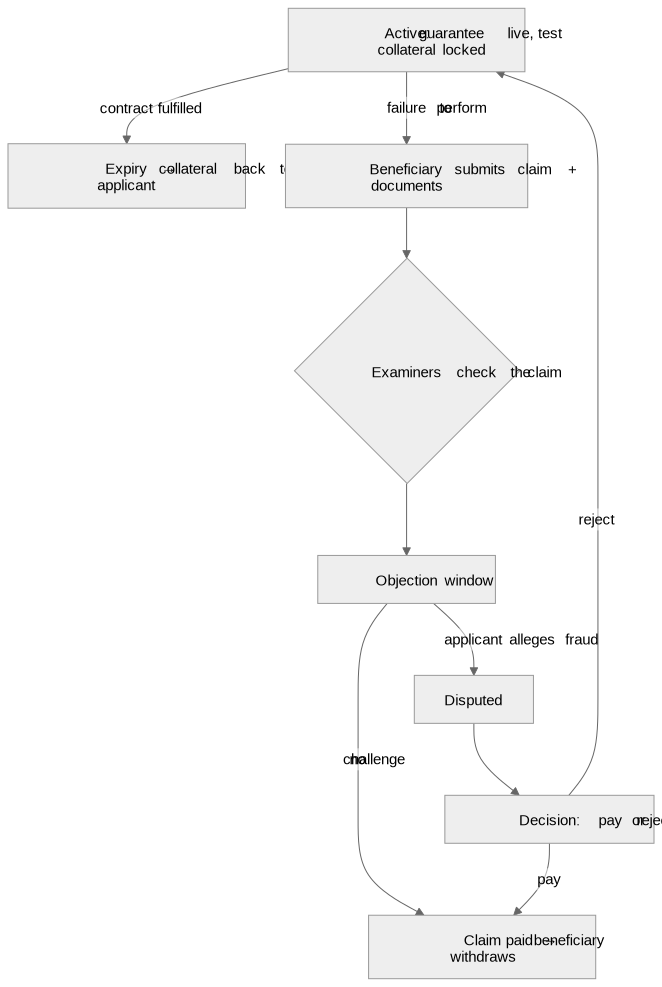
- No claim before expiry: Tutup jaminan kedaluwarsa (
expireAssurance) → Expired, collateral returns to the applicant. - Fraud challenge: only within the objection window, the applicant clicks Ajukan sengketa klaim (
disputeDemand) → Disputed. In the prototype, an admin decides to pay or reject. In the trial, the challenge is handled by the issuing bank under URDG 758 and applicable law. - Amendment: the issuer can change the value or expiry (
amendAssurance) while Active. - Full claims only (no partial claims).
Guarantee statuses: None · Requested · Active · DemandPending · Disputed · Settled · Expired · Cancelled.
8. Mini FAQ
- What does "on first demand" mean? A claim that meets the guarantee terms is paid without having to prove a dispute under the underlying contract; refusal is only possible on proven fraud.
- What do the examiners check? Whether the claim documents match the guarantee terms, not the contents of the project contract. In the trial, the decision and the timing of payment rest with the issuing bank.
- Can it renew automatically (evergreen)? No. A Guarantee has a fixed expiry date (unlike an SBLC).
- Terms: open /glosarium.